
In the time of AI, the trend to use AI agents to improve work efficiency is inevitable. The same goes for marketing efforts such as for website SEO, GEO, and AEO. The times have changed for flooring retailers, where conventional marketing strategies have gradually lost their dominant impacts. Using AI tools to increase web exposure to generate new sales lead is essential for today’s flooring retailers.
Using AI agent to build a new website protocol is therefore essential to increase web exposure and traffic for flooring retailers. The age of AI disruptions.
AI Feed Protocols
Considering that the website used to be a directory page full of company names and addresses, the web page has developed into a mass internet of data that covers all areas of industry knowledge and information. The mix of useful information and not-so-useful information with mega-trillions of data starts to make search engines less user-friendly when readers need to filter out unnecessary information manually, both energy- and time-inefficient.
The intrusion for AI is something that can change the way the internet works from a fundamental use habitat. With the increasing trend, AI agents are trained to execute browsing for us. People are asking ChatGPT, for example, with questions from simple topics to complex solutions.
According to Cloudflare, there are now more than 4% of web browsing traffic being generated through AI agents. This number suggests 1 in 24 page loads actually comes from AI and not humans. The trend is expected to grow and reach up to 60% by 2030, according to Goldman Sachs.
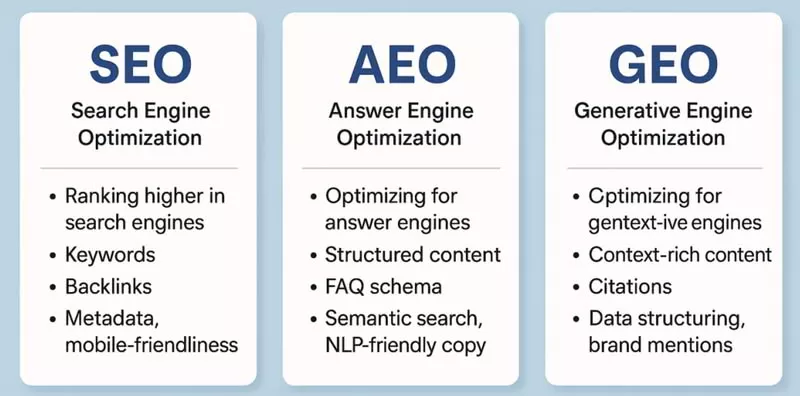
Overview of SEO GEO AEO
- SEO evolution: Most people prefer having answers given directly rather than searching for them, which is reshaping how information is accessed. As a result, Search Engine Optimisation (SEO) is evolving toward AI-driven assistants and agents that deliver faster, more personalised responses than traditional web searches.
- AEO & GEO: Two approaches emerging from this shift are Answer Engine Optimisation (AEO) and Generative Engine Optimisation (GEO). AEO focuses on making content easier for AI engines to understand, while GEO aims to make that content the trusted source AI relies on when generating future responses.
To effectively implement AEO and GEO strategies, teams need well-structured data and content that directly answers questions. While this is already visible in digital commerce, other sectors like finance will soon also use AI engines to compare products and analyze the market trends using trusted data sources and trust scores. Therefore, it is important to establish enough domain authority too.
Implications
With such a phenomenon, the conventional way of web marketing is breaking. Over the past two decades, the practice of optimising page, creating content that is designed for humans to read, and traffic conversion techniques was all that was needed to successfully launch a website. Maybe a bit more work into the SEO strategies.
However, AI agents do not browse like ordinary humans do. With rapid efficiency to scan through thousands of pages in seconds and deep thinking logic, new structured information to deliver higher accuracy to specifics means conventional web pages will lose its exposure.
When a potential flooring buyer asks ChatGPT, “What are the best vinyl flooring products in Houston?”, the AI is unlikely to display your website, as it will go directly to the most authoritative source of information. The result is your website becomes invisible and loses web exposures.
AI Agent Webpage Strategies
Building Pages
Not 10 pages, but hundreds of pages. Each page targets a specific query buyers ask on AI, such as ChatGPT, Claude, or Gemini. By optimising each and every question to get an effectively optimised page for SEO, GEO, and AEO.
Structure a Machine Readable Data
AI agent does not read but rather parses. Setting up schema markup, clean HTML, and structured data will make the page citation-ready for AI agents. Most conventional web pages aren’t built for that, and implemented AI agents can effectively improve this.
Constant Updates
AI algorithms change very rapidly. Whether it’s ChatGPT, Gemini, or Perplexity, each of these AI agents shifts on crawls and ranks content. Keeping constant updates manually is not ideal, as it is both inefficient and time-consuming.
Building AI Agents for Floor Retailer Websites
Below are some strategies that should be considered when building an AI agent for a floor retailer website:
- Mapping How Consumers Search for Flooring Products (Website / AI)
- Tweak Website Structurer for best SEO GEO AEO Performance
- Dominate Local SEO / GEO / AEO Search Results
- Build Flooring Product Catalog into SEO / GEO / AEO Setting
- Build Content Engine that Answers Real Flooring Questions
- Optimise Visual Search Assets
- Refine Smart Keyword Research
- Utilise on User Experience (UX)
- Get More Local Backlinks for Authenticity
- Build Featured Snippets for “People also ask” Boxes
- Leverage AI into Flooring Content Building Workflow
Mapping How Consumers Search for Flooring Products (Website / AI)
Key intent stages from research to purchase
When hunting for new flooring, customers generally follow a loosely predictable path, moving from initial daydreaming to the final purchase. Inspiration comes first. Then evaluation. Specification. Finally, the purchase. Early on, potential buyers crave visuals and ideas: think mood boards, staged room photos, and those ever-helpful comparison guides. Mid-stage? That’s when they start dissecting materials, comparing durability, and scrutinizing prices across various brands and individual product lines. And the final stage? Local availability matters most. Exact measurements. Sample ordering. Installation quotes. Appointment scheduling. For many, the journey begins online, but ends in a brick-and-mortar store. Especially common in home improvement. Call it webrooming. The takeaway? Content and site navigation must align with these distinct phases. An AI agent, properly equipped with the right prompts and data, can then guide each user smoothly toward a sale at every step.
Voice, image and in-store discovery signals
Search is evolving. Voice searches tend to be laser-focused—short, task-oriented requests. Think “Flooring stores open now near me.” Or “best way to refinish an oak floor.” Visual search? Users upload photos, hunting for matching planks, textures, or color schemes. Often, visuals and voices blend seamlessly with traditional text searches and even with in-store behavior. Shoppers in the aisles, phones in hand, comparing prices, verifying product details, or checking out reviews. Retailer sites should highlight essential product characteristics, present crystal-clear images, and offer up-to-date local inventory. This empowers AI and visual-match tech to swiftly address diverse search requests. The result? Actionable solutions: sample requests, nearby stock info, or installation bookings. Make image metadata a priority. Ditto canonical product images. Offer short, conversational voice answers. Slash the friction between discovery and purchase.
Tweak Website Structurer for Best SEO, GEO, and AEO Performance
Service area pages and URL hierarchy
Structure your URLs thoughtfully. Mirror product and geography. Use a clear, crawlable structure. For example, /locations/{city}/{service} for location-specific pages. And /products/{category}/{product-slug} for individual products. Devote one core page to each physical store. Create separate pages for mobile or installer-based services. Avoid generic, cookie-cutter city pages that simply swap out the city name. Instead, each location page needs unique, local signals. Think: address, phone number (with local area code), hours of operation, staff/installer profiles, nearby project showcases, and localized FAQs. Make it distinctive. Something search engines and AI can definitively link to a specific location. For service-area businesses, explicitly declare your territory. List cities, zip codes, or geo-coordinates. Use readable text on the page. Use a machine-readable area served in schema. Reduce any ambiguity for local search.
LocalBusiness and product schema basics
Embed JSON-LD LocalBusiness markup on every location page. Also, the Product or ProductGroup schema on every product page. Local businesses should detail: name, phone, address (or service area), geo coordinates, openingHours, and a link to your Google Business Profile (if available). For service-only locations, use area Served instead of a physical address. Product schema needs: product code, brand, name, description, image, offers (price, availability, currency), and customer ratings (if applicable). Use ProductGroup for variations (size, color, finish). This allows agents to match user preferences to the correct product. Keep schema current. Automate JSON-LD generation from your CMS or PIM. This keeps inventory, prices, and local availability aligned with your sales data. Always test using Rich Results and structured data testing tools.
SKU pages, inventory feeds, and keeping agents in sync
Real-time POS and CMS integration patterns
Synchronization is key. Point-of-sale (POS), CMS/PIM, and your website must operate in harmony. This ensures that AI shows correct availability, pricing, and appointment options. Several approaches support flooring retailers with multiple locations. Event-driven webhooks. Fast APIs. A single, reliable data source within a PIM or headless commerce system. Webhooks instantly notify connected systems about sales, returns, or inventory changes. A lightweight inventory API or cache enables rapid data retrieval for agent requests and visual matching. Design resilient endpoints. Implement message queues (for retries). Use shadow-testing when updating feed formats. For situations where split-second accuracy isn’t crucial, schedule regular incremental updates (every 5–15 minutes). Include timestamps in your feeds. This signals data freshness to users. Most importantly, centralize your product identifiers (SKU or GTIN) across POS, PIM, and CMS. This ensures agents correctly identify product variations (size, finish, and length). No confusion allowed.
Structured product data and SKU schema
Make each product machine-readable. Use Product and Offer markup. Include inventory signals that both agents and search engines can understand. Use JSON-LD, generated directly from your PIM/CMS. Be sure to include: product code, brand, name, description, high-quality image, offers.price, offers.priceCurrency, offers.availability, offers.url, and aggregateRating (if available). For items with variations (plank length, width, finish), use a ProductGroup. Alternatively, include nested ItemList/Offer variants. An agent can then match user specifications to the precise product. For local stores, include store-specific availability. Or, export a Local Inventory feed to Merchant Center (store_code, quantity, pickup_method, sale_price_effective_date). This ensures search and ad platforms reflect in-store stock. Automate schema generation. Include a lastUpdated timestamp. Test pages with structured data and Rich Results tools. Catch any missing fields. Prioritize accuracy over completeness. Omit any information you can’t reliably keep up-to-date.
Optimise Visual Search Assets
Image metadata, captions and alt-text strategies
Excellent images are crucial for visual search and AR. But metadata makes them findable. Write descriptive alt text. Explain what the image shows (material, color, pattern, room context). Don’t just repeat the page title. For decorative elements, use an empty alt attribute. Include an ImageObject JSON-LD block. Include a caption and contentUrl for main product images. Present one primary product image per variation. Ensure visual-match models connect visuals to the correct product. Store EXIF or XMP fields. Capture details like camera angle, lighting, and shot type. This supports internal visual models. However, rely on structured schema and human-written captions for public visibility. Name files descriptively (brand-material-finish-room.jpg). Use modern formats (WebP/AVIF). Provide multiple responsive sizes. Achieve optimal performance and consistent visual signals for AI.
Accepting user photos: privacy and consent
Allowing shoppers to upload photos for visual matching or AR previews can boost sales, but creates privacy and legal concerns. Secure explicit consent before processing or storing photos. Present a short, clear explanation of purpose (visual match, AR preview, installer quote). Provide choices: immediate, use-only processing vs. storage for future personalization. Collect only essential data. Avoid requesting unnecessary personal information. Use automatic redaction for obvious personal details in images (faces, IDs). Offer a simple way for users to delete their uploads. Allow them to opt out of model training or personalization. Log consent and timestamps. Support compliance and user requests.
Privacy, retention and opt-in practices
Adopt restrictive data retention and access rules. Keep temporary images only as long as needed (e.g., 24–72 hours for a visual match preview). Retain them longer only with explicit consent (saved projects, wishlists, or training). Document retention periods in your privacy policy. Restrict internal access to authorized staff. Encrypt stored images. If you use uploaded photos to enhance your models, provide a clear opt-in. Allow users to withdraw consent later. Comply with deletion and export requests promptly. Display a concise privacy notice on every upload dialog. Link to the full privacy policy. Keep users informed.
Build Featured Snippets for “People also ask” Boxes
Snippet-friendly QA templates and page patterns
Frame each question as an H2 or H3 heading. Provide a concise, self-contained answer directly below it. Deliver the most critical information within the first 40–60 words. Then, expand with supporting details, examples, and links. Use clear language. Restate the question’s subject. Avoid pronouns. This ensures the excerpt is understandable even without context. Ideal for featured snippets and voice assistants. For comparison or specification queries, use simple HTML tables with clear headers. For step-by-step tasks, use numbered HowTo blocks. Adapt to search engine preferences. Apply the FAQ Page or HowTo schema to relevant Q&A blocks. But consider schema a suggestion, not a guarantee. Monitor snippet performance and iterate. Migrate high-impression PAA questions to on-page Q&A sections. Test variations of the lead answer. Determine which one gets extracted.
Local install guides and maintenance Q&A
Local installation and maintenance questions are excellent candidates for PAA and featured snippets. They combine clear intent with local relevance. Develop location-specific install guides. Address common local questions like “how long does laminate install take in [city]” or “does hardwood need acclimation in humid climates.” Give short answers followed by specifics (typical timelines, local code issues, permit requirements, and climate factors). Pair each guide with a concise maintenance Q&A (cleaning frequency, product recommendations, scratch repair). Agents can then provide instant solutions. Include a clear call to action in each Q&A (sample request, schedule an estimate). Showcase store-level availability or installer booking options below the answer. Shorten and track the path from snippet to conversion. Refresh these pages frequently. Use Search Console PAA reports. Capture new question variations. Maintain accurate answers.
Keywords by intent for local and visual flooring queries
Cluster queries for agents and page mapping
First, group keywords by user intent. Then, by local or visual search type. Typical clusters: inspiration (look, ideas, gallery), comparison (engineered vs solid, pros and cons), specification (plank width, thickness, wear layer), transactional (buy, sample, price, stock), and service (installation, repair, measurement). For each cluster, assign one core page or content module. Supplement with supporting pages or FAQs. For instance, link a “Hardwood buying guide” to inspiration and comparison. Connect individual product pages to specification and transactional. And point store-location pages to service and local availability. Define a visual-search cluster. Include intent terms like “match this floor,” “floor color match,” or “upload photo.” Ensure these pages feature clear image metadata and a visual match interface. The AI can then connect the query to relevant products. Maintain a keyword-to-page document. List primary intent, supporting keywords, target URL, and preferred microcopy (CTAs, booking text). Agents will then use consistent phrasing.
Use Search Console, autocomplete and PAA signals
Prioritize actual user behavior over assumptions. Use Search Console. Identify high-impression queries that lead to your site. Group them into the intent clusters above. Pinpoint pages with snippet or PAA opportunities. Combine autocomplete and “people also ask” variations from Google and Bing. Expand conversational phrasing. These often represent voice and agent-style requests. For visual queries, analyze image search data. Review on-site search logs for upload and “match” keywords. Regularly export these signals (monthly). Incorporate the insights into content priorities and schema updates. Monitor key metrics by cluster—impressions, click-through rate, PAA appearance, and conversions. Decide whether to enhance a page, add a FAQ, or build a localized landing page.
AI agent KPIs, governance and local authority signals
Events, conversion metrics, and attribution model
Establish KPIs reflecting both discovery and completed actions. Key metrics: assisted conversions (sessions with agent interaction), goal completions (sample requests, estimate bookings, calls), micro-conversions (image uploads, chat-to-book flows, product matches), resolution rate (agent answers without human help), and time-to-success (query to booking). Track these as distinct events in analytics: agent_open, intent_matched, sku_suggested, sample_requested, appointment_booked, and handoff_to_human. Link events to revenue (order_id, estimate_value). Record timestamps and location data. Attribute in-store visits to digital interactions.
Use a hybrid attribution model. Last non-direct click for paid/local campaigns. Agent-assist credit model assigns partial credit to agent interactions before a conversion. Maintain an experiment pipeline. Test agent prompts, UX flows, and product prioritization. Measure improvements with A/B tests. Always display data freshness and confidence scores with agent responses. Internal teams can then assess whether an answer was auto-generated or staff-verified.
Local backlinks, citations, and review strategies
Local prominence hinges on accurate citations and genuine local backlinks. Verify NAP (name, address, phone) consistency across your site and major directories. Claim and optimize your Google Business Profile for each store. Publish location-specific case studies or project galleries. Encourage links from local sites, trade organizations, and suppliers. Promote structured review acquisition. Use post-transaction email prompts. SMS review links. In-store QR codes linking to location profiles. Respond to reviews promptly and honestly. Tag and share common issues with product and operations teams. Align content and agent answers with real-world feedback. Monitor backlink growth and domain authority at the local level. Don’t focus solely on the corporate domain.
Content governance, review, and publishing ownership
Define clear ownership and SLAs for every content type used by the agent. Assign content owners: product data steward (product details), local content manager (location pages), legal/privacy reviewer (upload flows), and an editor for FAQs. Maintain a content registry. Record author, last-reviewed date, review frequency, and confidence level for agent use. Mandate human verification for critical answers (warranty, installation, code compliance). Use version control. Implement staged publishing (staging -> beta -> production). Have a rollback plan for incorrect responses. Conduct regular audits. Combine analytics (error rates, complaints) with manual checks. Ensure the agent’s outputs are accurate, locally relevant, and trustworthy.